Massachusetts Edition · Birth to Three

A clinical field guide
for the living room floor.

Built by an Early Intervention clinician, for EI clinicians — OT, PT, SLP, and developmental specialists working birth to three in Massachusetts. Stop fighting your laptop during home visits — keep the knowledge you need in your pocket.

Download on the App Store $9.99 Android & Web Access $9.99

One-time purchase · No subscription · Works offline

Motor · 9–12 months
Field Guide
Pulling to stand at furniture?
Cruising along furniture?
Pincer grasp emerging?
If / Then
IF
Not pulling to stand by 12 mo
THEN
Supported standing at couch, weight bearing play
Field Guide · Motor 9–12 mo
The reality

You know this feeling.

You're sitting cross-legged in a family's living room. A toddler is climbing on you. The parent is watching. And you're trying to remember whether pincer grasp should be emerging at 9 months or 12, and what the red flags are for this age range.

You didn't go into Early Intervention to second-guess yourself. You went in to help kids and families.

AI in EI puts the clinical knowledge you need in your pocket — organized the way your brain actually works during a session.
What's inside

Every tool you need in the home, nothing you don't.

Field Guides

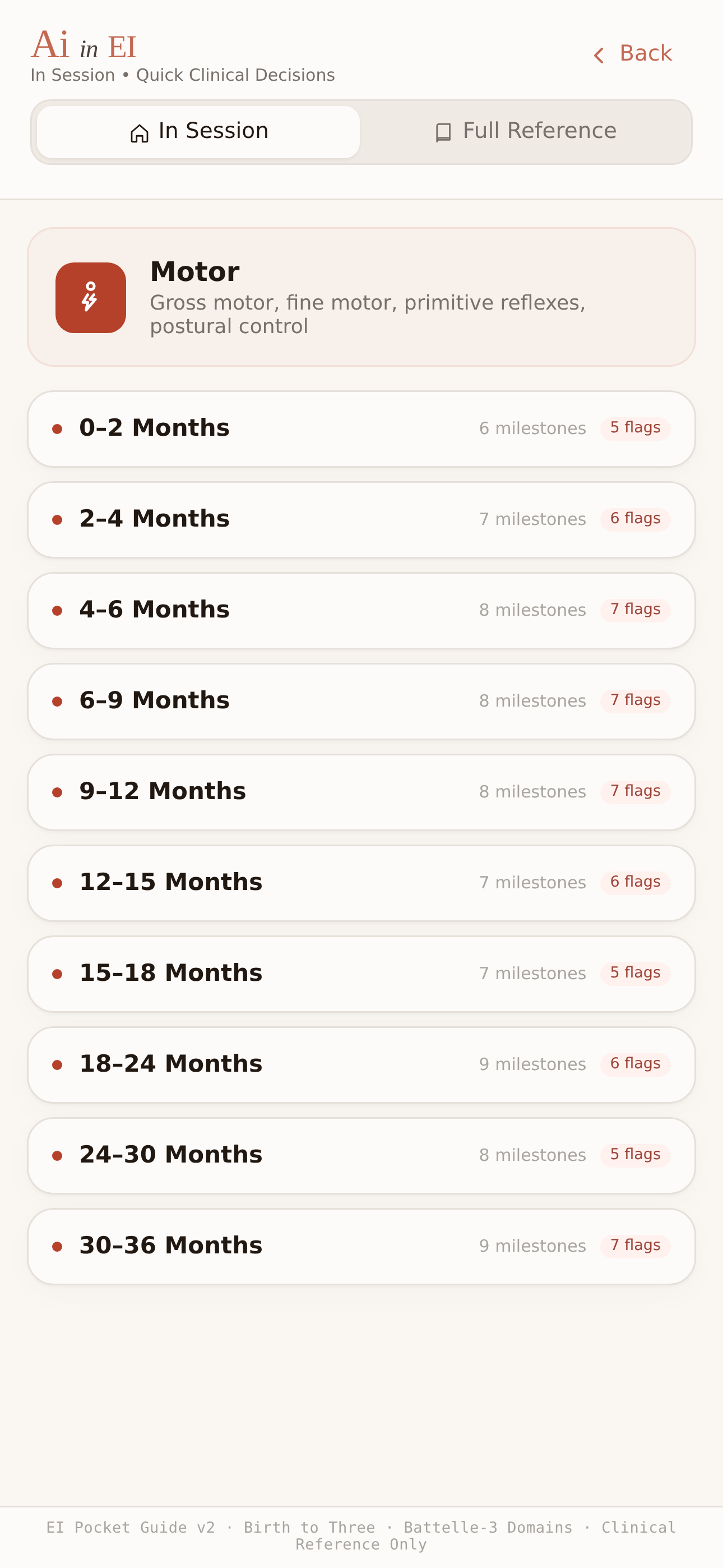
Fast clinical decisions for every age range across all five developmental domains. Quick scan, priorities, if/then calls, session flow, parent scripts — glanceable from the floor.

38guides

Structured Activities

Each with target skill, materials, step-by-step, grade up, grade down, what to look for, and a parent talking point you can use on the spot.

117activities

DPH Compliance Checklists

Every event type — intake, evaluation, IFSP, 6-month review, annual, transition, routine visits. Validated against the December 2022 MA EI Operational Standards.

7events

Diagnosis Reference

Down syndrome, ASD early signs, prematurity, cerebral palsy, torticollis, hypotonia — each with domain-specific impact, precautions, and parent education.

24refs

Billing & Productivity

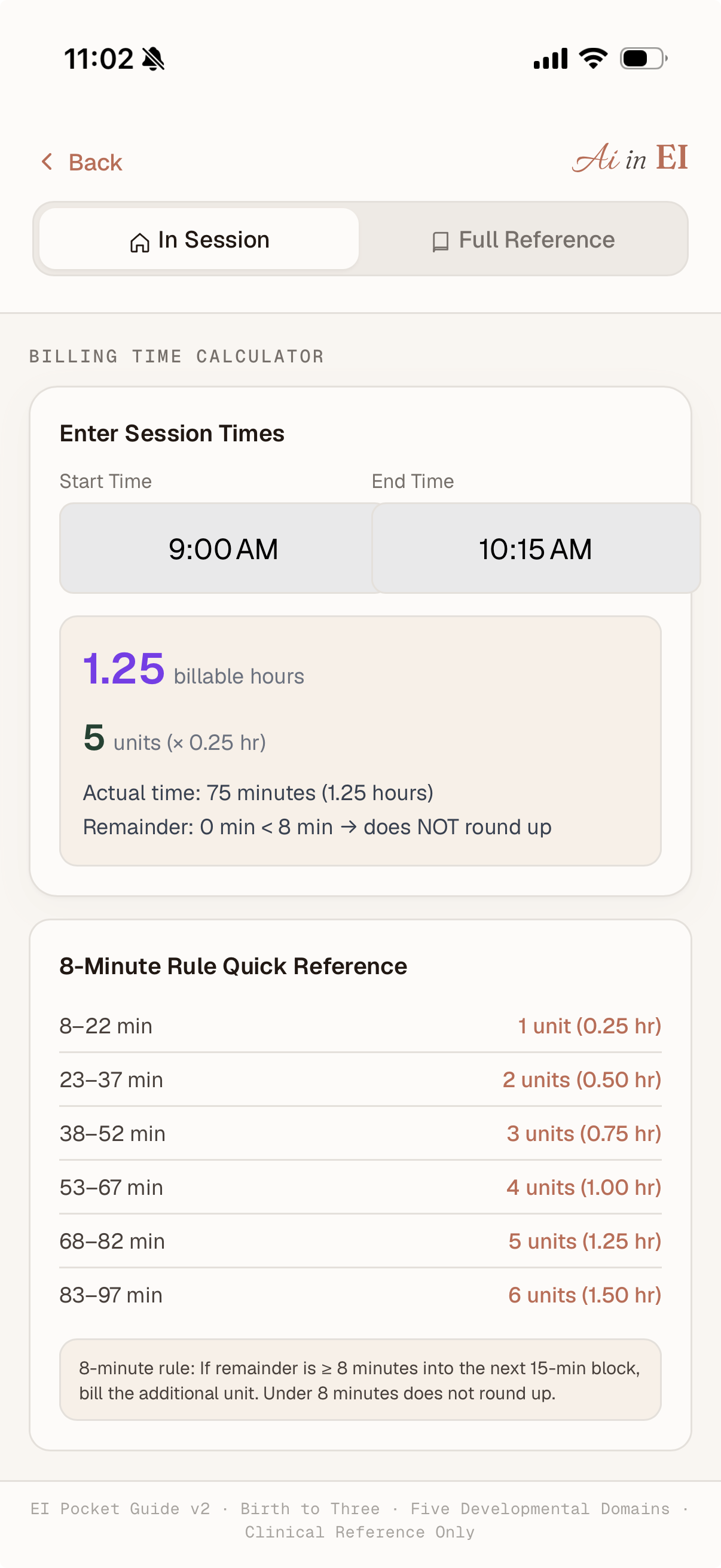
Time-to-units calculator with the 8-minute rule. Productivity tracker with adjustable targets and EI benchmarks. No more mental math in the car.

2tools

Works Offline

Once loaded, the entire app works without internet. Because half the homes you visit have terrible wifi, and kids don't care about your connection.

always on
Good to know

What AI in EI is — and isn't.

The “AI” in AI in EI is the product name, not artificial intelligence. There's no chatbot, no auto-diagnosis, no machine learning making clinical decisions. It's a structured clinical reference tool — built by a clinician, for clinicians.

AI in EI is not…

  • An AI chatbot or diagnostic tool
  • A parent-facing milestone tracker
  • A replacement for clinical judgment or supervision
  • A documentation or billing system
  • A medical device

AI in EI is…

  • A structured clinical field guide for home visits
  • Peer-reviewed milestones, red flags, and activities by domain and age
  • DPH compliance checklists validated against MA Operational Standards
  • Parent coaching scripts you can use on the spot
  • A tool that works the way your brain works during a session

No child data. No patient data. No tracking.

AI in EI collects no child data, no session notes, no patient information, and no personal health data. There are no accounts, no logins, and no analytics tracking. The app works entirely on your device. Nothing leaves your phone.

Two modes

One app, two shapes of attention.

Same domain. Same age. Different depth.

Motor · 9–12 months
Quick Scan
In Session
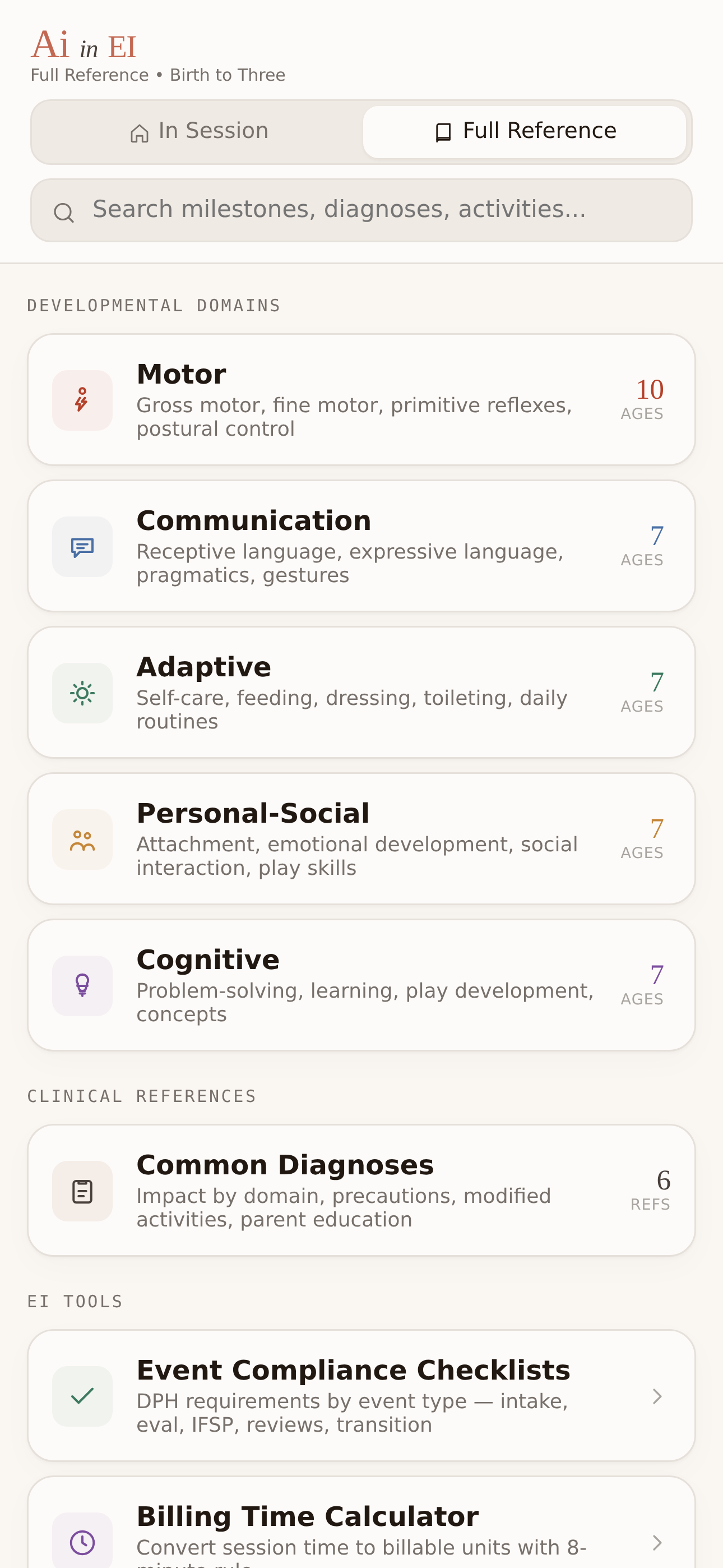
Full Reference
Scan · 1/3 Priorities If/Then
Pulling to stand at furniture?
Cruising along furniture?
Pincer grasp emerging?
In Session · Motor 9–12 mo

Big fonts. Tappable checklists. Built for the living room floor.

same domain
same age
quick decisions · deep reference
Motor · 9–12 months
Milestones
In Session
Full Reference
Field Guide Milestones Red Flags Activities
Pulls to stand using furniture
Cruises along furniture (lateral stepping)
Neat pincer grasp (thumb to fingertip)
Full Reference · Motor 9–12 mo

Every milestone, activity, red flag, and diagnosis. For prep and study.

Birth–3 · 5 domains · 10 age windows · MA DPH validated

Behind the app

Built by a clinician,
not a corporation.

BH
Brian Harold
MOT, OTR/L · Early Intervention OT · Massachusetts · Since 2018

I'm an OT working in Early Intervention in Massachusetts. I built AI in EI because I was tired of fighting my laptop in living rooms — scrolling through dense reference materials while a parent watched and a toddler pulled at my screen.

I wanted a tool that works the way my brain works during a session: what am I seeing, what does it mean, what do I do about it, and what do I tell the parent. That's what the Field Guide does.

And I wanted a reference I could trust — built on the actual DPH Operational Standards, not someone's best guess at what compliance requires. That's what the checklists do.

This isn't a generic milestone app for parents. It's a clinical tool built for the specific reality of EI work in Massachusetts.

Questions

Frequently asked.

Who is AI in EI for?

+

Licensed Early Intervention professionals working in Massachusetts — OTs, PTs, SLPs, developmental specialists, service coordinators, and supervisors. It's a clinician tool, not a parent app.

What does “AI” stand for in the name?

+

AI in EI is the product name. The app is a structured clinical reference tool. It does not use artificial intelligence, machine learning, or chatbot technology to make clinical decisions.

What’s included for $9.99?

+

38 field guides, 117 structured activities, 7 DPH compliance checklists, 24 diagnosis references, billing and productivity tools, and offline access. One-time purchase, no subscription.

Does the app collect child data or session notes?

+

No. AI in EI collects no patient data, no child data, no session notes, and no personal health information. There are no accounts and no logins. Everything stays on your device.

Does it work offline?

+

Yes. Once loaded, the entire app works without internet. Built for homes with limited or no wifi.

Is this just for OTs?

+

No. The content covers all five developmental domains — motor, communication, cognitive, adaptive, and social-emotional. It’s useful for any EI discipline working birth to three.

Will there be editions for other states?

+

That’s the plan. Massachusetts is the first edition. Other states depend on clinician demand and access to state-specific regulatory information. If you want your state next, let us know.

Can I get this for my whole team?

+

Reach out directly. Agency and team access options are in development. Contact Brian at contact.aiinei@gmail.com.

Founding Clinician Group

Help shape what comes next.

AI in EI is built by a clinician, and it gets better with clinician feedback. If you're working in Massachusetts EI — whether you're an OT, PT, SLP, developmental specialist, service coordinator, or supervisor — I want to hear what works, what's missing, and what would make this more useful in the field.

Join the Founding Clinician group and help shape version 1.1.

Share Your Feedback →

No commitment. No spam. Just a clinician asking other clinicians what they need.

For agencies & supervisors

Give every clinician on your team a consistent field guide.

If you're running an EI program, you already know: onboarding takes months, compliance expectations keep shifting, and your clinicians are making dozens of fast clinical calls in the field every day.

AI in EI gives every clinician on your team a portable reference — milestones, red flags, compliance checklists, parent coaching language, and structured activities — organized by domain and age, validated against MA DPH standards.

It’s not a replacement for supervision. It’s a field guide that makes supervision conversations more productive.

Contact Brian about team access →

Consistent clinical reference across your whole team

Faster onboarding for new clinicians

DPH compliance checklists for every event type

Ready-to-use parent coaching scripts

Works offline in any home visit environment

Not in Massachusetts? Other state editions are in development.

Tell us your state and we’ll notify you when it’s available →
Ready when you are

Sit on the floor. Trust the app.

Start every session knowing exactly what to focus on, what to do, and what to say.

Download on the App Store $9.99 Android & Web Access $9.99

One-time purchase · No subscription · Works offline